Navigating the platform
A quick tour of the main sections and navigation of ServedByAI.
ServedByAI is designed to be intuitive and easy to navigate. Here is a quick overview of the main sections you will use.
Top navigation
The main navigation bar at the top of every page gives you quick access to the most important sections:
- Browse Services: explore all available AI services organized by category
- Browse Tasks: view open tasks posted by buyers looking for AI help
- How It Works: learn about the platform process for buyers and providers
- Log In / Get Started: sign in to your account or create a new one

Your dashboard
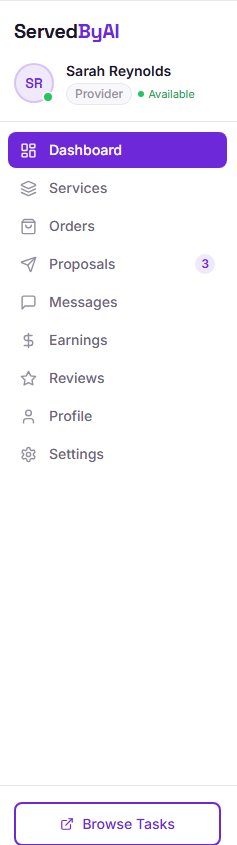
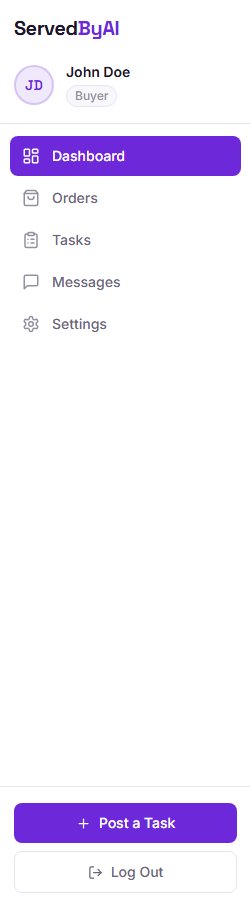
Once logged in, your dashboard is your home base. It shows your key stats, recent activity, and quick links to everything you need. The sidebar on the left gives you access to all your tools:
Buyer sidebar
- Dashboard: overview of your activity and stats
- Tasks: manage your posted tasks
- Orders: track your active and completed orders
- Messages: communicate with providers
- Settings: update your profile and account preferences
Provider sidebar
- Dashboard: overview of your activity, earnings, and stats
- Services: manage your service listings
- Proposals: track your submitted proposals
- Orders: manage active and completed orders
- Messages: communicate with buyers
- Earnings: view your earnings and payout history
- Reviews: see reviews from your clients
- Profile: edit your public provider profile
- Settings: update your account preferences